Outbound Link Click Tracking: Capture Every Exit Click

Most analytics setups track what happens on your site but go blind the moment a visitor clicks a link that takes them off it. That’s a real gap — affiliate links, partner referrals, “book a call” buttons pointing to a scheduling tool, social profile links. Outbound link click tracking closes that gap by recording every exit click as an event, so you can see where your traffic actually goes.
I treat outbound clicks as a core part of any serious conversion tracking setup. They’re often the last meaningful signal you get before a user leaves — and for affiliate or referral-driven sites, that click is the conversion. Let me show you how to capture it cleanly.
What Counts as an Outbound Link
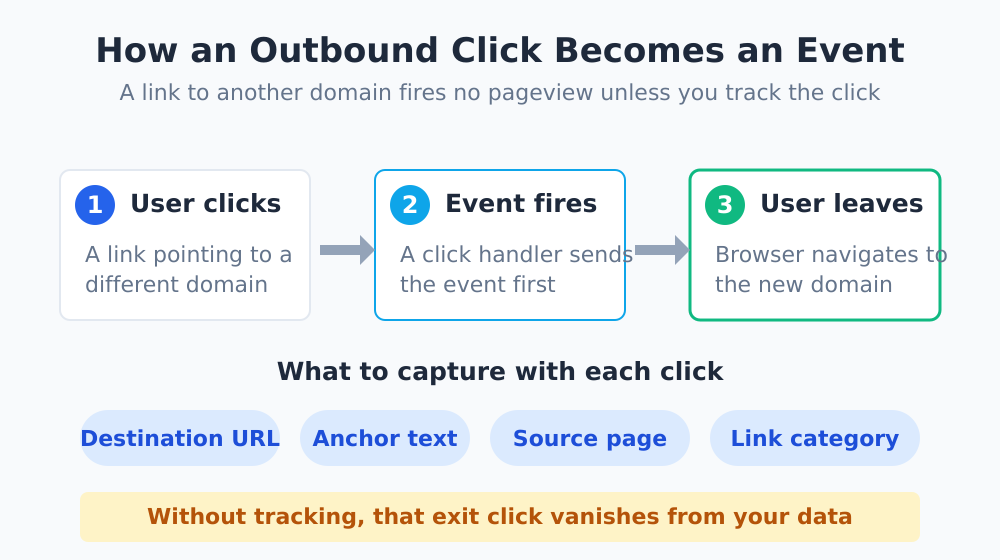
An outbound link is any link whose destination is a different domain than your own. The browser doesn’t load another page on your site — it navigates away entirely — so a standard pageview never fires for the destination. Unless you explicitly track the click, that interaction simply vanishes from your data.
| Link Type | Why You’d Track It |
|---|---|
| Affiliate / referral links | The click is often the revenue event |
| “Book a demo” to external scheduler | Hand-off point to your sales funnel |
| Documentation / external resources | Shows which references readers actually use |
| Social profile links | Measures channel cross-pollination |
| Partner / sponsor links | Proves value to partners with real numbers |
Why It Belongs in Your Tracking Plan
Outbound clicks tell you something pageviews can’t: where your content sends people next. For a publisher running affiliate offers, an untracked outbound link means you can’t tie revenue back to the page that earned it. For a B2B site, an untracked “schedule a call” link means a hole right where your funnel hands off to sales.
The outbound click is the most underrated event in web analytics. It’s the last thing a visitor does on your site, and it usually points straight at intent — yet most setups let it disappear without a trace.
This is closely related to tracking on-page interactions like form submissions, button clicks, and downloads — the difference is that outbound clicks end the session, which makes the timing and method a little trickier.
How Outbound Click Tracking Works
The core idea is simple: attach a listener to outbound links, and when one is clicked, send an event to your analytics tool before the browser navigates away. The challenge is the race condition — the page may unload before your event finishes sending.
The Modern Approach: Beacon and Auto-Tracking
Older implementations used hacks like a short delay before navigation, which felt janky. Modern analytics platforms solve this with the Navigator.sendBeacon API, which reliably sends data even as the page is unloading. Most tools now use it under the hood.
Better still, many platforms can detect and tag outbound clicks automatically. Google Analytics 4’s enhanced measurement includes an “outbound clicks” event out of the box — you just toggle it on. Privacy-focused tools like Plausible offer outbound link tracking as a documented feature too.
Manual Tracking When You Need Control
If you want more than the default — for example, classifying links by category (affiliate vs. partner vs. resource) — you’ll tag links manually. The pattern looks like this:
| Step | What Happens |
|---|---|
| 1. Detect | Find links where the host differs from your domain |
| 2. Listen | Attach a click handler to those links |
| 3. Classify | Read attributes (e.g. a data attribute) to label the link |
| 4. Send | Fire an event with destination + label via a beacon |
A useful convention is to add a data attribute like data-link-type="affiliate" to links you want categorized, then read it in your handler. That way one report can break outbound clicks down by purpose instead of lumping them together.
What to Capture With Each Click
A bare “outbound click happened” event is better than nothing, but a little extra context makes the data far more useful:
- Destination URL. The full target so you can see exactly where traffic flows.
- Destination domain. A cleaned-up host for easy grouping in reports.
- Link text or label. What the link said, which hints at intent.
- Source page. Which of your pages sent the click — essential for content analysis.
- Link category. Your own classification (affiliate, partner, resource).
With those properties, you can answer questions like “which blog posts drive the most affiliate clicks?” or “are readers actually clicking the external docs I link to?” — exactly the kind of insight that turns content into a measurable channel.
Reading the Data Without Fooling Yourself
A few cautions from experience. First, an outbound click is not a guaranteed conversion — the visitor still has to do something on the other side. Treat it as a strong intent signal, not a finished sale, unless the click itself is the paid event.
Second, watch for accidental inflation. If you auto-track every external link including your own footer social icons and cookie-policy links, your “top outbound” report fills with noise. Decide which links genuinely matter and either exclude the rest or segment them out. This is the same discipline behind building dashboards that drive decisions rather than dashboards that drown you in counts.
The Bottom Line
Outbound link tracking is one of the cheapest, highest-value additions you can make to an analytics setup. For most platforms it’s a single toggle; for the rest it’s a small script. Either way, you stop losing sight of visitors at the exact moment their intent is clearest.
Turn it on, add a category for the links that matter to your business, and watch which pages quietly send the most valuable traffic onward. If you want to round out the picture, pair this with my guide to capturing on-page interactions like forms and downloads — together they cover almost everything a visitor can do that a pageview misses.