Conversion Value Tracking: Assign Real Worth to Every Action

Here’s a problem I see in almost every analytics setup I inherit: conversions are tracked, but they’re all worth the same — nothing. A newsletter signup, a $9 trial, and a $4,000 enterprise deal all show up as “1 conversion.” Conversion value tracking fixes that by attaching a real number to every action, so your reports finally reflect business impact instead of raw counts.
Once you assign value to conversions, a lot of downstream analysis gets easier. You can rank channels by revenue contribution, feed value back into your conversion tracking strategy, and stop optimizing for cheap actions that don’t pay the bills. Let me walk you through how I think about it.
What Conversion Value Actually Means
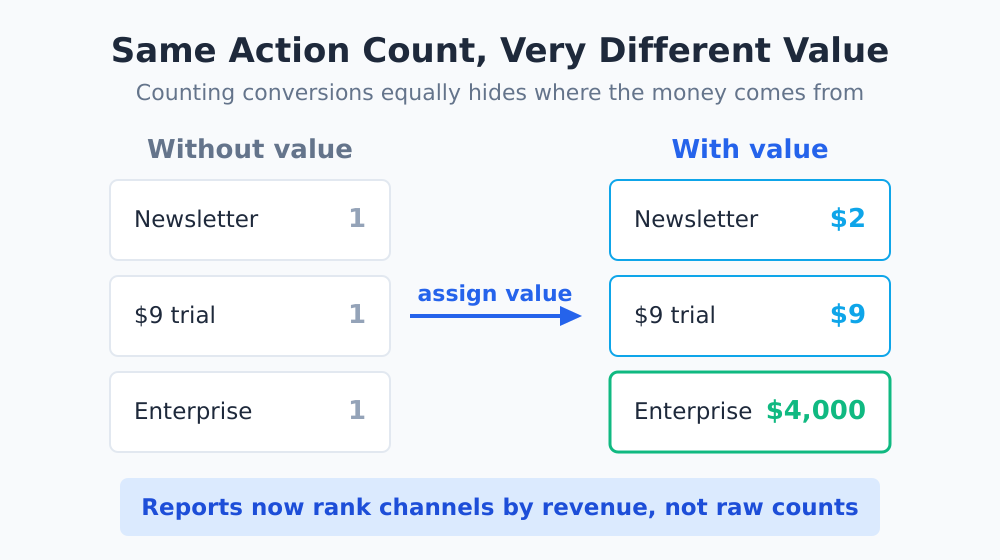
Conversion value is the monetary worth you assign to a tracked conversion. For a purchase, that’s straightforward — it’s the order total. For everything else, you have to decide what the action is worth to your business.
The key insight is that not every conversion deserves the same value. A demo request from a qualified lead is worth far more than a generic content download. When all conversions count equally, your data quietly lies to you about where the money comes from.
| Conversion Type | Has Direct Revenue? | Value Approach |
|---|---|---|
| E-commerce purchase | Yes | Dynamic — pass the actual order total |
| Subscription signup | Yes (recurring) | First payment or expected lifetime value |
| Demo request / sales lead | Indirect | Estimated value (deal size × close rate) |
| Newsletter signup | Indirect | Small fixed proxy value |
| Content download | Indirect | Small fixed proxy value or $0 |
Why $0 Conversions Hide Your ROI
When a conversion has no value, your reporting tools treat it as free money — an outcome with no weight. That breaks three things at once.
- Channel comparison falls apart. A channel driving 100 newsletter signups looks better than one driving 5 enterprise demos, even though the demos are worth ten times more.
- Bid strategies optimize for the wrong thing. If you run paid campaigns with value-based bidding, a missing value tells the algorithm every conversion is equally cheap to chase.
- Executives lose trust. When the analytics number says “500 conversions” but finance says revenue is flat, people stop believing the dashboard.
A conversion without a value is just a tally mark. The moment you attach money to it, your analytics stops counting actions and starts measuring outcomes — and that’s the difference between a vanity report and a decision-making tool.
How to Estimate Value for Non-Revenue Conversions
The hardest part is valuing actions that don’t directly generate money — lead forms, signups, calls. I use a simple, defensible formula instead of guessing.
The Lead Value Formula
For a lead-generation conversion, work backward from a closed deal:
Lead value = Average deal size × Lead-to-customer close rate
If your average customer is worth $3,000 and roughly 5% of demo requests become customers, then each demo request is worth about $150. That’s not a perfect number, but it’s grounded in real business math — and it’s far better than zero.
Proxy Values for Micro-Actions
For lighter actions — newsletter signups, account creation, soft engagement — I assign small fixed proxy values (say $1–$5) based on how reliably they predict a future sale. These are intentionally modest. The goal isn’t precision; it’s giving each action enough weight to rank meaningfully against the others. This pairs naturally with how you’d treat micro-conversions in a broader funnel.
Passing Value Into Your Analytics
Once you’ve decided on values, you need to send them with the conversion event. Most platforms support a value (and currency) parameter on conversion or purchase events.
In Google Analytics 4, for example, recommended events like purchase accept a value and currency parameter, documented in the GA4 event reference. For dynamic e-commerce values, you pull the order total at runtime; for static lead values, you hard-code the estimate on that specific conversion. Google’s own guidance on conversion values is worth reading if you also run ads.
| Scenario | Value Source | Currency Handling |
|---|---|---|
| Single-currency store | Order total from cart | Set one fixed currency code |
| Multi-currency store | Order total + per-order currency | Pass currency dynamically per transaction |
| Lead form | Static estimated value | Set to your reporting currency |
One practical tip: always pass the currency code explicitly. If you operate in multiple markets and let the platform assume a default, your value reports silently mix euros and dollars into a meaningless total. The ISO 4217 currency codes are the standard most tools expect.
Connecting Value to the Rest of Your Analytics
Conversion value isn’t a standalone metric — it’s a multiplier that makes everything else sharper. With values in place, your attribution models distribute revenue across touchpoints instead of distributing equal-weight conversions. Your funnel reports can show value flowing (and leaking) at each step, not just user counts.
It also changes how you read campaign performance. A campaign with a low conversion count but high average value might be your best performer — something you’d never see in a count-only report. This is the same shift in thinking behind building dashboards that drive decisions: report on outcomes, not activity.
Common Mistakes to Avoid
- Inflating proxy values. If your newsletter signup is worth $50 in the system but never converts, you’ll over-invest in a dead-end channel. Keep proxies conservative.
- Forgetting to update estimates. Deal sizes and close rates drift. Revisit your lead values a couple of times a year so they don’t go stale.
- Double-counting recurring revenue. For subscriptions, decide once whether you report first-payment value or lifetime value — and be consistent across reports.
- Mixing real and estimated values without labeling. Keep dynamic (actual) and static (estimated) conversions distinguishable so you know which numbers are facts and which are assumptions.
The Bottom Line
Counting conversions tells you how busy your site is. Valuing them tells you how profitable it is — and that’s the report leadership actually cares about. Start with your revenue conversions where the value is obvious, then work outward to leads and micro-actions using grounded estimates.
The first time you re-rank your channels by value instead of count, you’ll probably be surprised by what’s actually carrying your results. If you want to go deeper on the foundations, my full conversion tracking guide covers how to capture these events cleanly in the first place.