Referral Exclusions: Stop Self-Referrals From Hijacking Attribution

You check your acquisition report and something looks off: your own domain appears as a traffic source, or a payment processor like a checkout gateway is suddenly “referring” a chunk of your conversions. Those are self-referrals, and they quietly corrupt your attribution by stealing credit from the channels that actually earned the visit. The fix is a referral exclusion list — and it’s one of the most overlooked hygiene steps in analytics.
I run into broken referral handling on almost every site that uses a third-party checkout, a separate login subdomain, or an external booking tool. It’s a small configuration with an outsized impact on data quality, and it ties directly into clean conversion tracking. Let me explain what’s happening and how to stop it.
What a Self-Referral Is
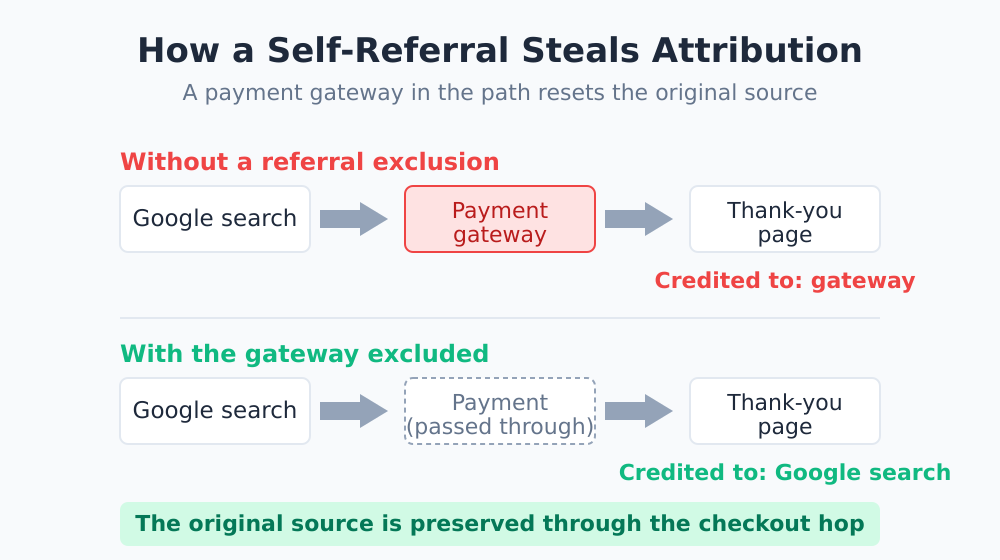
A self-referral happens when your analytics records a visitor as having arrived from a domain that’s really part of your own flow — your own site, or a trusted third party the user passes through on the way to converting. Instead of preserving the original source (say, organic search), the tool resets attribution to that intermediate domain.
The classic example is a payment gateway. A user arrives from Google, browses, clicks “buy,” gets redirected to an external payment page, then returns to your thank-you page. To many analytics tools, that return looks like a brand-new visit referred by the payment provider — so the sale gets credited to the gateway, not to Google.
| Source of Self-Referral | What Goes Wrong |
|---|---|
| External payment / checkout gateway | Sales credited to the processor, not the real channel |
| Separate login or account subdomain | Session resets when the user returns to the main site |
| External booking / scheduling tool | Conversions attributed to the booking domain |
| Your own domain appearing as a referrer | Session fragmentation, inflated source counts |
Why This Wrecks Your Attribution
Self-referrals don’t just add a weird line to a report — they actively rewrite history. When the payment provider gets credit, three things break.
- Channels lose their conversions. Organic, paid, and email all look weaker than they really are because their hard-won sales got reassigned at the last step.
- Sessions fragment. A single journey gets split into two sessions, inflating your session count and deflating metrics like pages-per-session.
- Attribution models break down. Your attribution models can only work with the path they’re given — and a self-referral truncates that path right before the conversion.
A self-referral is attribution theft. The channel does all the work of bringing a visitor in, and then a payment page that the user spent ten seconds on walks away with the credit. Excluding referrals puts that credit back where it belongs.
How Referral Exclusions Fix It
A referral exclusion list tells your analytics, “if a visit arrives from one of these domains, don’t treat it as a new source — preserve whatever the original source was.” When the user comes back from the payment gateway, the tool keeps the session alive and the attribution intact.
In Google Analytics 4, this is handled in the data stream settings under “list unwanted referrals,” documented in Google’s unwanted referrals help. Your own domain is typically excluded by default, but third-party domains in your flow are not — you have to add them yourself. This is conceptually the same problem that cross-domain tracking solves when a single journey legitimately spans multiple domains you control.
Which Domains to Exclude
Here’s the audit I run when I take over a site. Go through your conversion flow and list every external domain a user touches between landing and converting.
| Domain Type | Exclude? | Why |
|---|---|---|
| Payment processors in your checkout | Yes | Users return mid-journey; preserve real source |
| Your own subdomains (login, app) | Yes | Same visitor, same journey |
| External booking / scheduling tools | Yes | Part of your conversion path |
| Genuine referral partners | No | That traffic really is a referral — keep it |
| Search engines and social networks | No | These are legitimate acquisition channels |
The line to walk carefully: only exclude domains that are part of your own flow, not domains that genuinely send you new visitors. Over-excluding is as harmful as under-excluding — if you exclude a real referral partner, you’ll lose visibility into a working channel.
How to Find Self-Referrals in Your Data
You don’t have to guess. Open your acquisition or traffic-source report and look for two tells:
- Your own domain listed as a source. If
yoursite.comappears as a referrer, you have session fragmentation to fix. - Payment or utility domains with surprising conversion volume. A checkout provider showing up near the top of your converting sources is a red flag, not a marketing win.
Sort your sources by conversions and scan the top of the list. Anything that’s a tool rather than a channel deserves a second look. This kind of routine check belongs in any analytics audit you run on an inherited or aging setup.
After You Apply the Exclusions
Two things to keep in mind once you’ve added your list. First, the change isn’t retroactive — historical data stays as it was; only data collected afterward reflects the fix. Note the date you made the change so you can interpret the before-and-after cleanly.
Second, revisit the list whenever your stack changes. Add a new payment option, spin up a new subdomain, or adopt a new booking tool, and you’ve potentially introduced a fresh self-referral. A quick check after any infrastructure change keeps the problem from creeping back in.
The Bottom Line
Referral exclusions are a five-minute configuration that can meaningfully change which channels look like your winners. By keeping payment gateways, login subdomains, and booking tools from hijacking attribution, you give credit back to the search, social, and email efforts that actually brought visitors in.
Audit your conversion flow, list the domains users pass through, and exclude the ones that belong to your own journey. For the broader foundation this sits on, my complete conversion tracking guide covers how to capture clean, trustworthy conversion data from the start.